AI & Astrology
360HeartsInTheSky provides a mini Tropical Vedic astrology server that ChatGPT and Claude can call directly during a conversation, over the MCP protocol. In practice, an MCP plugs into your AI the same way an extension plugs into Chrome — setup takes about two minutes.
You ask the question, the AI runs the calculation through 360hearts, and it returns your chart with your dominant Aditya. The basic tools stay free, and the advanced avastha analysis (the planetary condition and dignity of a chart read through the Aditya system) is now available as part of the Explorer subscription.
This page collects ready-to-paste prompts so you get a good result immediately. Replace the birth details with your own, paste into your AI, read the answer. 🪷
Connect in 30 seconds
My recommendation today: Claude (claude.ai). It's the client I use daily with 360hearts, and so far it gives the most nuanced interpretations. ChatGPT also works well for the calculations themselves; it's a little less subtle on the narrative reading, but it remains a perfectly valid option. Neither requires any local install.
Note: Gemini does not yet offer custom MCP connectors, so it can't be used with 360hearts for now.
Claude — the recommended path
Custom connectors work on all claude.ai plans, including the free plan (which is limited to one custom connector).
Prefer to follow written steps? Here's the same walkthrough in text:
-
In claude.ai, at the bottom-left of the sidebar, click your profile name.
-
In the menu that appears, open Settings.
-
In the left column of Settings, click Connectors.
-
At the bottom of the connector list, click Add custom connector.
-
Give it a name — for example
360hearts— and paste this URL into the URL field:https://api.360heartsinthesky.com/mcp -
Confirm with Connect. The connector shows up in your list with the
CUSTOMlabel and your URL. You're done.
Claude is gradually migrating connectors from Settings → Connectors to Customize → Connectors. If the banner at the top of Settings redirects you, click Customize in the sidebar (under your profile name) and resume from step 3 — the rest is identical.
ChatGPT — via the "Apps" section
On ChatGPT, MCP connectors don't live under "Connectors" like on Claude — they live under the Apps section of Settings. The flow looks like this:
-
Open Settings in ChatGPT.
-
In the left sidebar of Settings, click Apps.
-
You'll see two lists: Enabled apps (the active ones) and Drafts (your personal apps created in developer mode).
-
Under Advanced settings, click Create app.
-
Give your app a name — for example
Aditya calcor360hearts— and point it to:https://api.360heartsinthesky.com/mcp -
Turn it on from Enabled apps so it's available during your chats.
At the time of writing, adding a custom MCP app on ChatGPT requires enabling developer mode; your app then appears with a DEV badge in the list, like any test app. OpenAI's interface changes often — if the labels or location shift, look for "Apps" rather than "Connectors" and follow the same logic.
At equivalent calculation quality, Claude still produces more nuanced interpretations today; ChatGPT nevertheless works very well for the computations themselves and for quick readings.
Manus AI — a pleasant surprise
In my tests, Manus handled 360hearts calls smoothly — connections were clean and readings came back well-formed.
Manus accepts a direct JSON import, which makes setup very fast.
-
In Manus, at the bottom-left of the sidebar, open Settings.
-
Click Connectors.
-
Click Add connectors.
-
Choose Custom MCP, then Add.
-
Select Import JSON and paste this configuration exactly:
{"mcpServers": {"360hearts": {"type": "streamableHttp","url": "https://api.360heartsinthesky.com/mcp"}}} -
Confirm. The
360heartsconnector appears in your list and you can start using it in your Manus chats.
Paid tools: avastha analysis (Explorer subscribers)
The free tools return your chart and your dominant Aditya. The avastha analysis goes one step deeper, running the same engine that powers the avastha panel of the Explorer tools on this site, now fully automated through the AI. It reads each planet inside its Aditya's full retinue, meaning the hora (D2) and trimsamsa (D30) beings that accompany that Aditya, and scores the planet's strength in virupas (the traditional strength points), giving you its uplifted, afflicted, and total values. It flags the states a planet may be in, such as dignity, shame, yuti (conjunction), or starvation. For any planet you ask about, the AI can retrieve the complete healthy and afflicted expression descriptions on its own, so raw placements may become a nuanced picture of planetary strength and quality. This analysis is part of the Explorer subscription.
What you need before you start
Claude is used through its website, claude.ai: the same version everyone uses, free to open in any browser. There is nothing to install. You configure the connector once in the browser, and it then also works in the Claude app on your phone afterward. It works even on Claude's free plan (which allows one custom connector).
The connector needs three values that live on your account page. Sign in on 360heartsinthesky.com and open your account page: as an Explorer subscriber you will see the three connector values there, each with a copy button:
- the connector URL,
- the OAuth Client ID,
- the OAuth Client Secret.
Keep that page open in another tab while you set things up, so you can copy each value in turn.
Step-by-step walkthrough
- On claude.ai, open Settings, then Connectors. This is the list of your connectors; the new one will appear here once it is added.
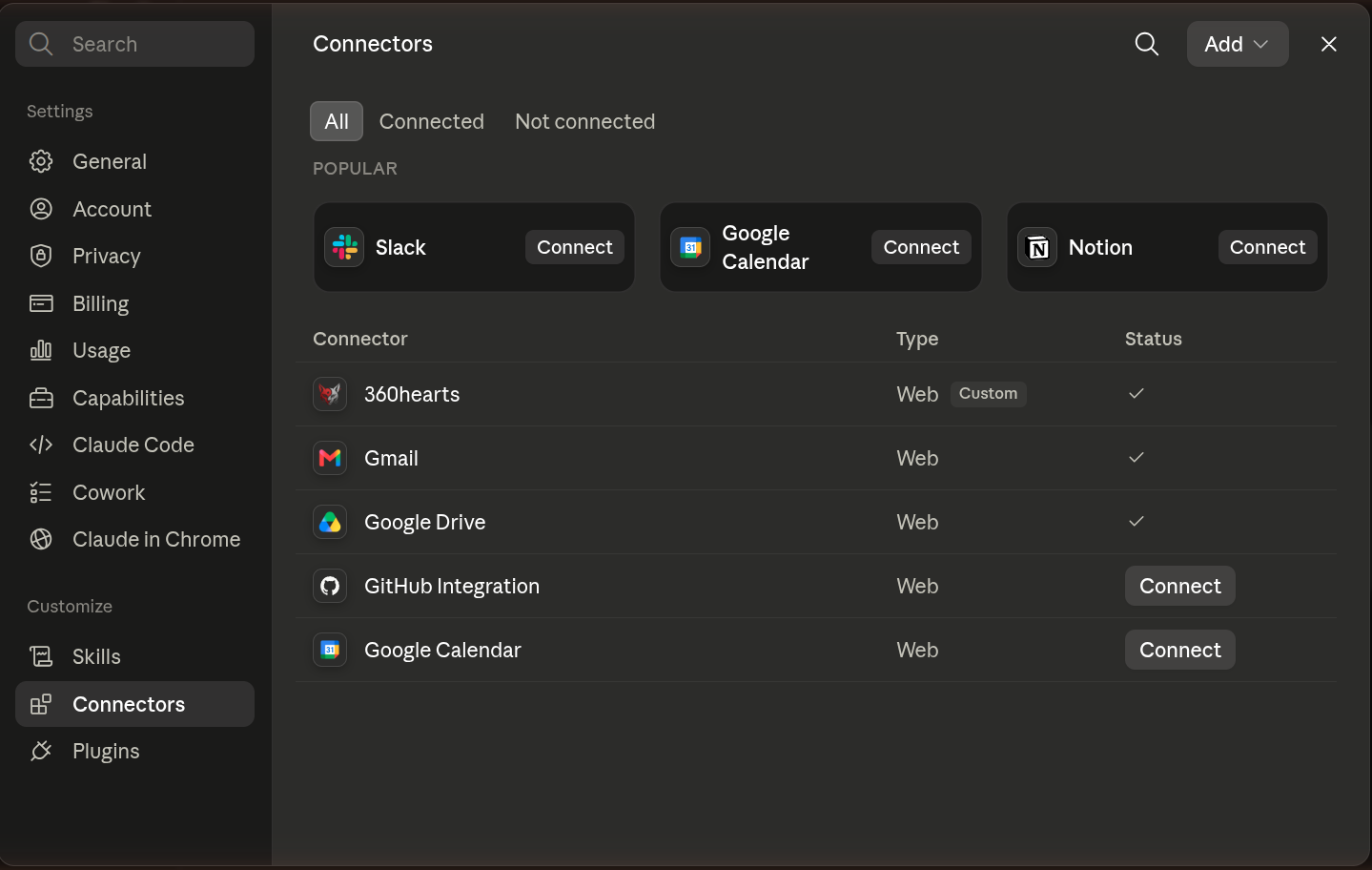 The Settings, then Connectors screen on claude.ai. Your new connector will show up in this list.
- At the bottom of the list, click Add custom connector. A small window titled "Add custom connector" opens. It has a name field, a URL field, and an "Advanced settings" section that unfolds when you click it.
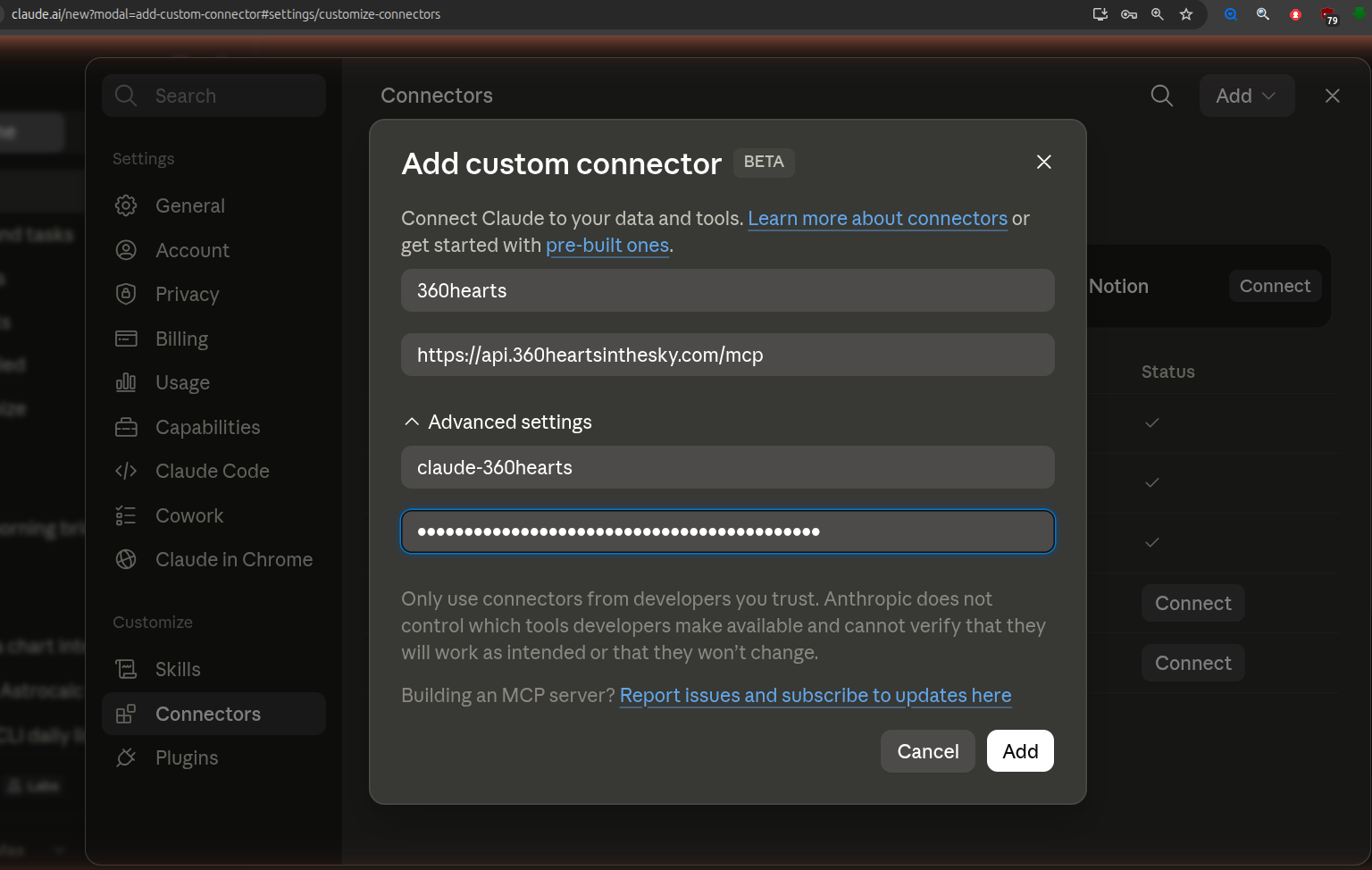 The "Add custom connector" window. Give it a name, paste the URL, then open "Advanced settings" to reveal the Client ID and Client Secret fields.
- Give the connector any name you like (for example
360hearts) and paste the connector URL from your account page into the URL field. - Open "Advanced settings" and paste the OAuth Client ID and the OAuth Client Secret from your account page into their fields.
- Click Add, then Connect. A 360HeartsInTheSky sign-in page opens. Sign in with YOUR OWN website account (the same one you use on this site) and click Allow.
- Back on claude.ai, the connector shows as connected. In a chat, enable it in the tools menu, then ask for an avastha reading with a birth date, time and place, for example: "Use the 360hearts avastha tool for June 17, 1988, 14:22, Lyon France, and tell me the condition of each planet."
The very first Connect can time out while the server wakes up. If that happens, just click Connect again, the second attempt is usually fast. Do not add or change any redirect setting; leave the defaults in place. And the Client Secret is a shared app configuration value, not a personal password: your access comes from your own login and your subscription, so it is normal that everyone uses the same secret.
A step-by-step video showing how to add this connector and how to use it is coming soon.
See it in action
Here is a real example conversation using the paid avastha tool. It is a fun reading, not to be taken too seriously, but genuinely interesting to see the tool at work.
An example prompt to copy
Not sure what to ask? This prompt requires the Explorer subscription (the connector set up above). Copy it as-is into your conversation (Claude or ChatGPT), then adapt it as you like:
Using the 360 Hearts avastha tool, tell me what my greatest assets are as a person: my best personality traits and natural talents. Connect them to my Hora and Trimsamsa avastha, and use those descriptions to tell me what I am already good at and what I need to work on. You can compare me to movie characters, well-known personality types, or familiar skill sets to make it all concrete. Also use what you already know about me: my job or my studies, my tastes, my hobbies, and adapt the description to whatever will help me understand best. You can search the web to add outside information if it helps illustrate a scenario, answer a question I ask, or explain something I do not know yet. Use the healthy and afflicted expressions to add nuance: which paths call for my vigilance, and where my potential lies. Match the length and tone to my usual preference: short and to the point if that is what I like, or longer, deeper and more revealing if that suits me better. Connect everything to my Aditya avastha and use it as the guiding thread of the description.
What about ChatGPT?
ChatGPT works with the paid connector too. To be honest: OpenAI keeps custom connectors behind a developer mode, and its interface changes often (things move or get renamed between versions). Setup is therefore more involved than on Claude, whose interface has stayed stable and consistent; that is one reason Claude is the recommended client here. But once configured, ChatGPT does the job well. Good news: recent versions of ChatGPT auto-detect all the technical settings, which makes the setup much simpler than it used to be.
- Open Settings and find Plugins in the left sidebar.
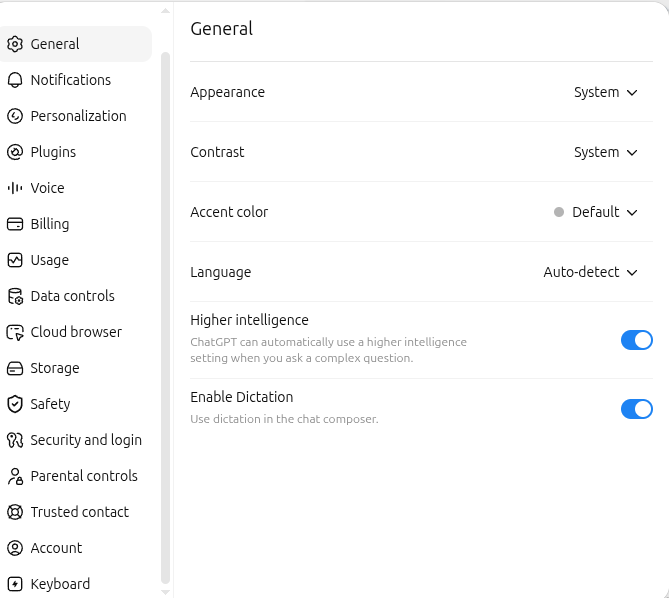 ChatGPT Settings: the "Plugins" entry sits in the left column.
You can also go straight to the chatgpt.com/plugins page and click the + button. If ChatGPT asks for it, enable developer mode.
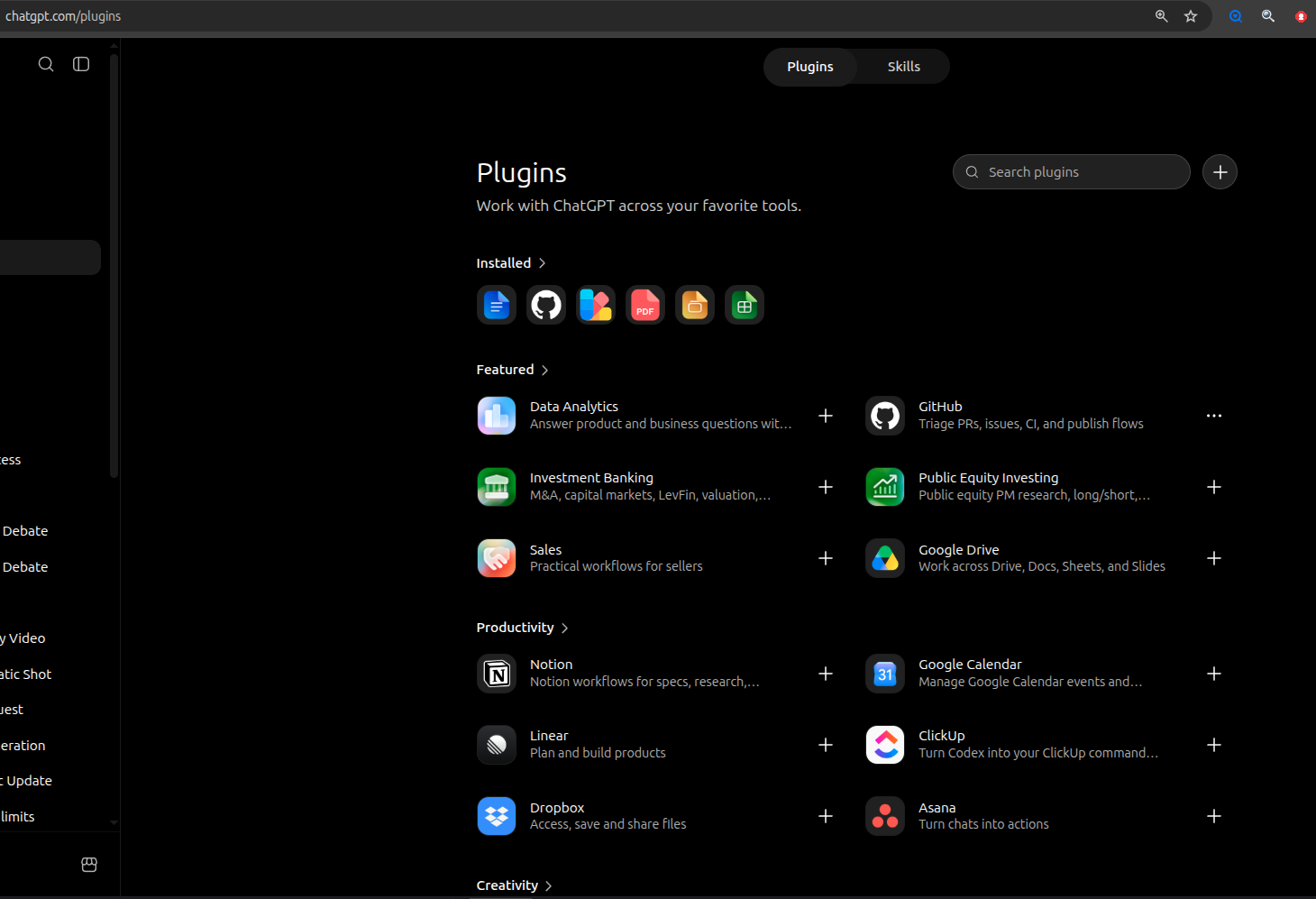 The chatgpt.com/plugins page: use the search or the + button to create a new plugin.
- Click New Plugin. In the form: give it a name (for example
Aditya calc), optionally a description, pastehttps://api.360heartsinthesky.com/mcpinto the Server URL field, then leave Authentication on OAuth. - Click "Advanced OAuth settings" to expand the panel: ChatGPT contacts the server and picks everything automatically, the "Dynamic Client Registration (DCR)" registration method, the
mcp:paidscope, and the authorization URLs. You have nothing to fill in here, just check that it looks like the screenshot below. No ID or secret to paste anywhere: ChatGPT registers itself with the server automatically.
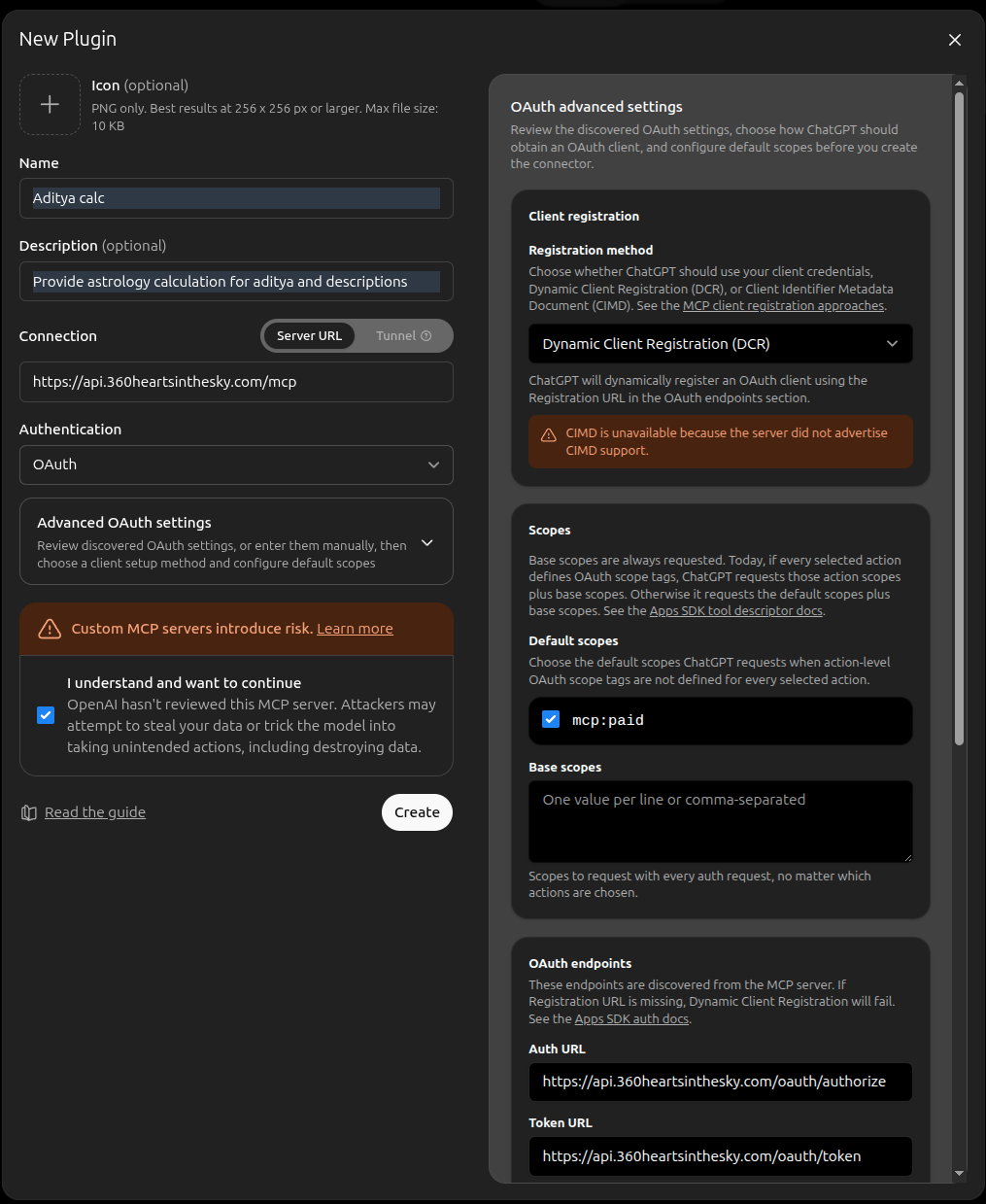 The "New Plugin" form with "Advanced OAuth settings" expanded: ChatGPT detected the DCR method, the
 mcp:paid scope and the authorization URLs on its own.
- Tick the "I understand and want to continue" box (OpenAI shows a standard warning for any custom MCP server), then click Create.
- Click "Sign in with 360HeartsInTheSky": the same 360HeartsInTheSky sign-in page as with Claude opens. Sign in with YOUR OWN website account and click Allow.
- Enable the plugin in your chats, then ask for an avastha reading exactly as you would with Claude.
Separately, if you use a header-capable developer tool such as Claude Code, the personal MCP key from your account page also works right now. For Claude Code, one line is enough:
claude mcp add --transport http 360hearts https://api.360heartsinthesky.com/mcp --header "Authorization: Bearer MCPK-your-key-here" --scope user
Four prompts for your birth chart
Every example uses the same fictional person: June 17, 1988, 14:22, Lyon France. Swap in your own birth details.
1. Birth chart — overview
The simplest prompt: both frames (Aditya + Tropical Western) side by side, plus a first narrative reading.
Use the 360hearts MCP to calculate my chart for June 17, 1988, 14:22, Lyon France.
Show me both tables (Aditya Circle and Tropical Western),
then give me a short narrative reading in the Aditya frame.
What the AI does: calls calculate_chart, displays both planetary-position tables, and opens the interpretation with the dominant Aditya.
What to expect: two clearly labeled tables + an opening paragraph on your dominant Aditya (Dhata, Varuna, Mitra, Vivasvan, etc.).
2. Personality traits — psychological portrait
Go beyond raw positions and get a real psychological portrait grounded in the authored description of your dominant Aditya.
Use the 360hearts MCP for June 17, 1988, 14:22, Lyon France.
Find my dominant Aditya, fetch its full description, then give me
a psychological portrait — strengths, blind spots, and core drives.
Stay in the Aditya frame.
What the AI does: calls get_dominant_aditya, then get_aditya_description, then synthesizes a portrait anchored in the authored Aditya text.
What to expect: a 3–5 paragraph portrait focused on the authentic themes of your Aditya — not a generic horoscope.
3. Western reading — explicit opt-in
The one case where the AI should leave the default Aditya frame and fall back to classical Western astrology (Sun / Moon / Ascendant).
Use the 360hearts MCP for June 17, 1988, 14:22, Lyon France.
This time I want a purely Western reading: Sun sign, Moon sign, and
Ascendant in the Tropical zodiac. Skip the Aditya narrative.
What the AI does: calls calculate_chart, pulls the positions from the Tropical Western frame, and writes a classical Sun / Moon / Ascendant interpretation.
What to expect: a traditional-horoscope style — but based on the Tropical zodiac (not Sidereal, not Jyotish).
The server always returns both frames in the raw data, but the default narrative framing uses the Aditya Circle. To get a purely Western reading you have to ask for it explicitly — otherwise the AI will default back to the Aditya frame.
4. Deep Aditya study — the frame as a tool
To dig deep into your Aditya profile without any contamination from Western vocabulary.
Use the 360hearts MCP for June 17, 1988, 14:22, Lyon France.
I want to study myself through the Aditya Circle. List my top two Adityas
by planetary weight, fetch the full description of each, and explain how
they interact in my chart — no Western sign names in this reading.
What the AI does: calls calculate_chart (or get_dominant_aditya) then get_aditya_description twice, and writes a dialogue between the two archetypes.
What to expect: a reading entirely in Aditya vocabulary — ideal for a user already familiar with the system who wants to go deeper.
Three prompts for Moon transits
These prompts use the get_moon_aditya_transit tool, independent from your birth chart — all it needs is a city or a timezone. The examples use Paris; swap in your own location as needed.
5. Where did the Moon transit this week?
The simplest case: a clean map of the last few days and the next one.
Use the 360hearts MCP to show me where the Moon transited this week
(I'm in Paris, timezone Europe/Paris). Give me the three Adityas —
previous, current, next — with their transition dates and times in
local time.
What the AI does: calls get_moon_aditya_transit with timezone="Europe/Paris" and returns the three Adityas in chronological order.
What to expect: three paragraphs in order — the Aditya you just left → the one you're in right now, until this date/time → the one that begins after that. Each paragraph carries the authored description of that Aditya.
6. Something shifted today
When an unexplained mood shift lands and you want a reading of the current moment.
I'm feeling oddly different today and I don't know why. Use the 360hearts
MCP to fetch the current Moon transit (I'm in Paris, Europe/Paris), then
check whether the current Aditya — or the one we just left — might shed
light on this shift.
What the AI does: calls get_moon_aditya_transit for now, notices whether you're close to a sector change, and focuses its reading on the previous → current hand-off or on the core theme of the current Aditya.
What to expect: a focused paragraph that connects your felt experience to the archetype in play right now (and sometimes the one you just left, if the shift is very recent). It's not a diagnosis — it's a symbolic reading.
7. Tell the AI about your days and look for resonance
The most reflective prompt: you share what you lived, the AI looks for correspondences inside the Moon transits.
These last three days in Paris: Monday I was tense all day, Tuesday I
felt light and creative, Wednesday I was easily irritated. Use the
360hearts MCP to pull the Moon transit over that period (timezone
Europe/Paris) and tell me whether the Adityas the Moon crossed
resonate — or not — with what I actually lived.
What the AI does: calls get_moon_aditya_transit, retrieves the sequence of Adityas that spanned the period you described, then compares your notes against each Aditya's themes, day by day.
What to expect: a nuanced correspondence — sometimes obvious ("yes, the Moon entering Varuna on Tuesday fits your sense of lightness"), sometimes quiet ("no clear echo for Wednesday — the active Aditya that day is more about X"). The AI should not force a match that isn't there.
Good habits
By default the narrative goes to the Aditya frame. If you want something else, say so (like prompt 3). Otherwise you risk a confusing mixed reading.
Starting with "Use the 360hearts MCP…" stops the AI from inventing planetary positions from memory. The server is the single source of truth for every calculation.
Without a precise birth time the Ascendant and houses are not reliable. If you don't know your exact time, say so — the AI can offer an approximate chart or a rectification test.
⚠️ Don't take AI-run rectification too seriously. Birth-time rectification is normally a professional astrologer's job — they cross-reference life events, felt experience, and house accuracy across many iterations. An AI may land on the right time by luck, or if you're sharp enough to read what it proposes — but treat its result as a working hypothesis, not a truth.
Some AIs can't reliably convert a city to coordinates. If your AI refuses to call the tool or picks the wrong location, add latitude, longitude, and timezone yourself: "Lyon France, 45.75 N, 4.85 E, UTC+2."
What NOT to expect
The server computes in Tropical Vedic — the Tropical zodiac combined with Vedic concepts (Adityas). Don't ask for classical Jyotish: no Nakshatras, no Ayanamsa, no Navamsa — those belong to a different framework.
They are two completely independent concepts. The dominant Aditya comes from a planetary-strength calculation; the Ascendant comes from the Eastern horizon at the moment of birth. They may sometimes coincide, but it's not a rule — don't conflate them.
If the response feels too generic ("Libras are charming and balanced…"), the AI may have fabricated a horoscope from memory without calling the server. Force it: "Actually call the 360hearts MCP and show me the raw data before interpreting."
Further reading
- The New Zodiac of the 12 Adityas — the full system taught here
More prompts will land here over time — Moon transit, compatibility readings, deeper Aditya analyses. If a prompt helped you or got you stuck, reach out via the contact page. 🌞
A word about MCP (and ChatGPT's DEV badge)
ChatGPT shows your 360hearts connector with a DEV badge — developer mode — as if you were tinkering with an obscure API. That's probably not an accident.
The MCP protocol is actually one of the simplest integration standards out there. Nothing new in the AI world either — your assistant calls an external tool, that's all. It's the exact equivalent of adding an extension to Chrome, or installing an app on your smartphone.
On security, an MCP server is as trustworthy as the person who built it — no more, no less. Exactly like installing a Chrome plugin or downloading an app on your phone: you're trusting the author. For this specific MCP server — the 360HeartsInTheSky one — nothing is kept server-side: no account, no recording of your birth information. You can disable the connector at any time. Other MCP servers may make different storage choices — check each one case by case depending on the author.
In a normal world, adding an MCP would be as trivial as installing an extension. ChatGPT chose to hide it behind developer mode — that's a marketing choice, not a technical safeguard: it keeps users inside their own app ecosystem. Claude, on the other hand, exposes connectors in the regular interface without drama. That's another reason I recommend Claude first. And Gemini, as of today, simply doesn't offer custom MCP connectors at all.